Every traveler entering or leaving Colombia must complete CheckMig, the country’s mandatory digital immigration form. Managed by Migracion Colombia, CheckMig is a free online pre-registration system that replaced traditional paper arrival and departure cards. You must fill it out between 72 hours and 1 hour before your flight or border crossing – and if you do not have a completed form, airlines can deny you boarding.
This guide covers everything you need to know about CheckMig in 2026: what it is, whether it is still required, how to complete it, what information you need, and how to avoid common problems. Whether you are a first-time visitor or a frequent traveler to Colombia, this page is your single resource for the CheckMig process.
What Is CheckMig?
CheckMig is an online immigration pre-registration form created by Migracion Colombia, the government agency responsible for border control and immigration. The form collects basic traveler information – passport details, flight numbers, accommodation addresses, and health declarations – before you arrive in or depart from Colombia.
The system was introduced to modernize Colombia’s border process. Instead of filling out paper forms on the plane or at immigration counters, travelers now submit their information digitally ahead of time. This speeds up processing at airports and land border crossings, and gives Colombian authorities advance notice of who is entering and leaving the country.
Key facts about CheckMig:
- It is completely free. There is no charge to fill out or submit the form.
- It is not a visa. CheckMig is a separate requirement from any visa you may or may not need.
- It is required for everyone. Both Colombian nationals and foreign visitors must complete it.
- It is required in both directions. You need one form for arrival and a separate one for departure.
- It must be completed online. There is no paper alternative.
The official website is apps.migracioncolombia.gov.co. Multiple scam websites charge fees for the same form – always use the official government site.
Is CheckMig Still Required in 2026?
Yes. CheckMig remains mandatory for all travelers entering and departing Colombia as of 2026. Despite periodic rumors on travel forums and social media that the requirement has been dropped, Migracion Colombia continues to enforce it at all international airports, land borders, and port entries.
Airlines check for a completed CheckMig before allowing you to board a flight to Colombia. At immigration, officers may ask to see your confirmation. While enforcement has varied at smaller land border crossings, the legal requirement applies to all entry and exit points.
For a detailed breakdown of the current rules and any recent changes, see our dedicated article: Is CheckMig Still Required in 2026?.
How to Fill Out the CheckMig Form
Completing CheckMig takes about 10 to 15 minutes if you have your documents ready. Here is a summary of the process:
Step 1: Go to the official site at apps.migracioncolombia.gov.co and select your language (Spanish or English).
Step 2: Choose whether you are completing the form for entry (llegada) or departure (salida).
Step 3: Enter your personal information exactly as it appears on your passport – full name, date of birth, nationality, passport number, and expiration date.
Step 4: Provide your travel details – airline name, flight number, and date of travel.
Step 5: Enter your accommodation address in Colombia (for arrival forms) or your destination address (for departure forms).
Step 6: Answer the health declaration questions. These cover symptoms, contact with infectious diseases, and vaccination status.
Step 7: Review all information, agree to the terms, and submit the form.
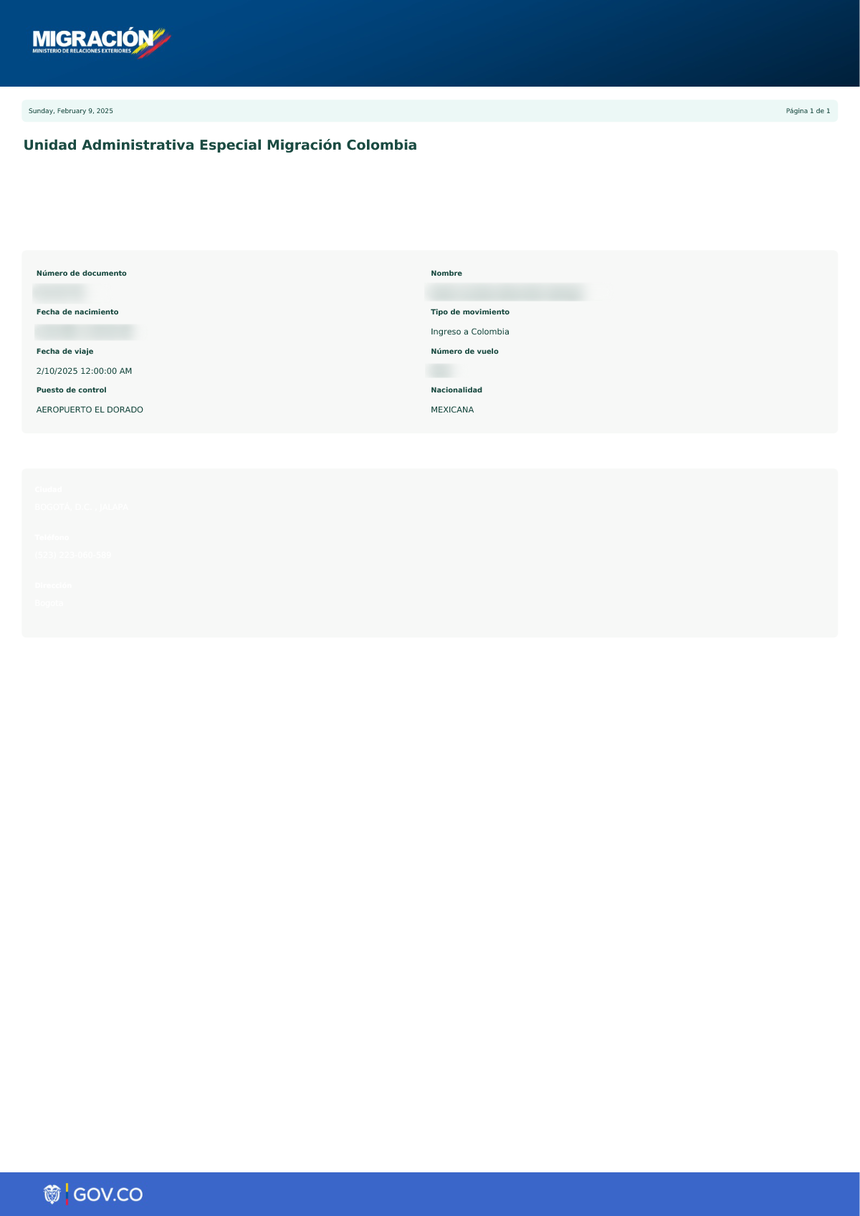
Step 8: Download or screenshot your confirmation PDF. You will need to show it at the airport.
For a complete step-by-step walkthrough with screenshots and field-by-field instructions, see: How to Fill Out the CheckMig Form.
When to Complete CheckMig
The CheckMig form has a specific time window. You must complete it:
- No earlier than 72 hours (3 days) before your scheduled arrival or departure
- No later than 1 hour before your flight departs
If you try to fill out the form more than 72 hours in advance, the system will not accept it. If you wait until less than an hour before your flight, you risk being unable to submit in time – and airlines may not let you board.
The best practice is to complete CheckMig the day before your flight. This gives you time to fix any errors, re-submit if the system has issues, and download your confirmation without rushing.
What Information You Need
Before you start filling out CheckMig, gather these documents and details:
Required for all travelers:
- Valid passport (number, expiration date, nationality)
- Full name exactly as it appears on your passport
- Date of birth
- Gender
- Email address (confirmation is sent here)
Required travel details:
- Airline name
- Flight number
- Date of arrival or departure
- Country of origin (for entry) or destination (for departure)
Required for entry forms:
- Address of your accommodation in Colombia (hotel name and address, or residential address if staying with someone)
- Length of stay
- Purpose of visit (tourism, business, transit, etc.)
Health declaration:
- Whether you have symptoms of infectious disease
- Whether you have been in contact with anyone with an infectious disease
- Vaccination information (if applicable)
Having all this information ready before you start will make the process much faster and reduce the chance of errors.
CheckMig for Entry vs. Departure
One of the most common points of confusion is that CheckMig covers both directions. You need to fill out the form twice during a trip to Colombia:
Arrival CheckMig (Llegada): Completed before you fly to Colombia. This is the form airlines check at your departure airport. It tells Colombian immigration who is arriving, where they are staying, and their health status.
Departure CheckMig (Salida): Completed before you leave Colombia. This is required even though you are leaving the country. Colombian immigration uses it to track departures and for security screening.
You cannot use the same form for both. Each CheckMig submission is linked to a specific flight on a specific date. If you are flying into Bogota and then flying out of Cartagena, you need two separate forms – one for arrival in Bogota and one for departure from Cartagena.
CheckMig Is Free – Beware of Scam Sites
CheckMig is a free government form. You should never pay to complete it. However, multiple third-party websites charge travelers between $20 and $80 USD to submit the form on their behalf. These sites often appear in Google search results above the official government website and may look professional.
Warning signs of scam CheckMig sites:
- They charge a fee (the real form is always free)
- They ask for payment information before showing the form
- Their URL is not apps.migracioncolombia.gov.co
- They promise “priority processing” or “guaranteed approval” (there is no approval process – the form is always accepted if filled out correctly)
- They appear as ads at the top of search results
Always go directly to apps.migracioncolombia.gov.co. For more on avoiding scam sites, see: CheckMig Official Website: Avoid Scam Sites.
Common CheckMig Problems and Solutions
The CheckMig system is not perfect. Travelers regularly report technical issues. Here are the most common problems and what to do about them:
The website is not loading or is very slow. This is the most frequent complaint. The site experiences heavy traffic, especially during peak travel seasons. Try accessing it during off-peak hours (early morning Colombia time, UTC-5). Clear your browser cache and try a different browser.
The form does not accept your passport number. Make sure you are entering the number exactly as printed on your passport, including any letters or special characters. Some nationalities have passport formats that confuse the system.
You did not receive a confirmation email. Check your spam folder. If it is not there, log back into the system and download the confirmation PDF directly from your submission history.
The form says your flight number is invalid. Double-check the airline and flight number against your booking confirmation. Some codeshare flights use different flight numbers than what appears on your ticket.
You need to make changes after submitting. You cannot edit a submitted form. You need to fill out a new one. The system will accept multiple submissions for the same travel date.
For a complete troubleshooting guide, see: CheckMig Not Working? Fixes for Common Problems.
CheckMig by Nationality
While CheckMig is required for all travelers regardless of nationality, some details vary depending on your passport:
US Citizens: CheckMig is required in addition to a valid passport. US citizens do not need a visa for stays up to 90 days. For full details, see: CheckMig for US Citizens.
UK Citizens: Same requirements as US citizens – CheckMig plus a valid passport, no visa needed for short stays. See: CheckMig for UK Citizens.
EU Citizens: CheckMig is required. Most EU passport holders can enter Colombia visa-free for up to 90 days. See: CheckMig for EU Citizens.
Other Nationalities: CheckMig is required regardless of whether you need a visa. If you do need a visa, that is a separate process. See: Colombia Visa Requirements.
For a complete overview of all entry requirements by nationality, see: Colombia Entry Requirements 2026.
CheckMig for Land and River Border Crossings
While most travelers encounter CheckMig at international airports, the form is also required at Colombia’s land borders with Ecuador, Peru, Brazil, Panama, and Venezuela, as well as at river ports in the Amazon region.
The process is the same – complete the form online before you reach the border crossing. However, enforcement at land borders has historically been less consistent than at airports. Some border posts may have staff who help travelers fill out the form on the spot, while others strictly require it before arrival.
If you are crossing a land border, complete CheckMig in advance using the nearest town’s internet connection. Do not assume you will be able to fill it out at the border crossing itself, as mobile data coverage can be unreliable in remote areas.
For specific guidance on border crossings, see: CheckMig for Land Border Crossings.
Frequently Asked Questions About CheckMig
Is CheckMig a visa?
No. CheckMig is a digital immigration pre-registration form. It is completely separate from visa requirements. You need CheckMig even if you do not need a visa to enter Colombia.
How much does CheckMig cost?
Nothing. CheckMig is free. If any website is asking you to pay, it is a scam. The official form at apps.migracioncolombia.gov.co has no fees.
Do I need CheckMig for a connecting flight through Colombia?
If you are staying in the international transit area and not passing through immigration, you may not need CheckMig. However, if you need to clear immigration – even to catch a connecting domestic flight – you must complete the arrival form. See: CheckMig for Connecting Flights.
Can I fill out CheckMig on my phone?
Yes. The official website works on mobile browsers. However, the site can be difficult to use on small screens. Many travelers find it easier to complete on a laptop or tablet.
How early can I fill out CheckMig?
The form opens 72 hours (3 days) before your scheduled arrival or departure. You cannot submit it before that window.
What happens if I do not fill out CheckMig?
Airlines may deny you boarding if you do not have a completed CheckMig. At immigration, you may be delayed while you fill out the form on the spot. In some cases, you could face fines or be refused entry.
Do children need CheckMig?
Yes. Every traveler, including infants and children, needs their own CheckMig form. Parents or guardians can fill out the form on behalf of their children.
Do Colombian citizens need CheckMig?
Yes. CheckMig is required for everyone entering or leaving Colombia, including Colombian nationals and dual citizens.
Is CheckMig the same as the old paper arrival card?
Yes, essentially. CheckMig is the digital replacement for the paper migration forms (tarjeta de migracion) that travelers used to fill out on the plane. The information collected is similar, but the process is now entirely online.
Can I fill out CheckMig for someone else?
Yes, as long as you have all their required information (passport details, flight info, etc.). Each person needs their own separate form with their own confirmation.
What to Do After Completing CheckMig
Once you have submitted your CheckMig form and received your confirmation:
- Download the confirmation PDF. Save it to your phone and email it to yourself as a backup.
- Take a screenshot of the confirmation page as an additional backup.
- Have it ready at the airport. Airlines will ask to see your CheckMig confirmation before you board.
- Keep it accessible during your flight. Immigration officers in Colombia may ask to see it when you arrive.
- Do not forget your departure form. Before your return flight, fill out a new CheckMig for departure.
More Resources
This pillar page covers the essentials of CheckMig. For deeper information on specific topics, explore our detailed guides:
- What Is CheckMig? – Full explanation of the form and its purpose
- How to Fill Out the CheckMig Form – Step-by-step field-by-field guide
- Is CheckMig Still Required? – Current 2026 rules and status
- CheckMig Not Working? – Troubleshooting common technical issues
- CheckMig Official Website – How to find the real site and avoid scams
- CheckMig Cost – Why it is free and how to avoid paying
- CheckMig Deadline – The 72-hour to 1-hour window explained
- Colombia Entry Requirements 2026 – Full list of documents needed by nationality
Last updated: July 2026. Information sourced from Migracion Colombia (migracioncolombia.gov.co). Always check the official website for the latest requirements before traveling.